
Oracle released a new version of its “Oracle Update Advisor”. This tool is part of Oracle AI Database 26ai, allows to anyone to check if their Oracle installation is up to date and download a new Gold Image updated to the latest version.
When using it with Oracle 19c, you need to download the tool “dbcactl“, which complements existing Database Creation Assistant – dbca – with the “managePatches” option – this is the Oracle Update Advisor.
To download dcbactl, you need to go to https://updates.oracle.com/download/6789999.html . While latest available version visible is 26.2.1, it is not downloadable. I did my tests using the version 25.4.1.
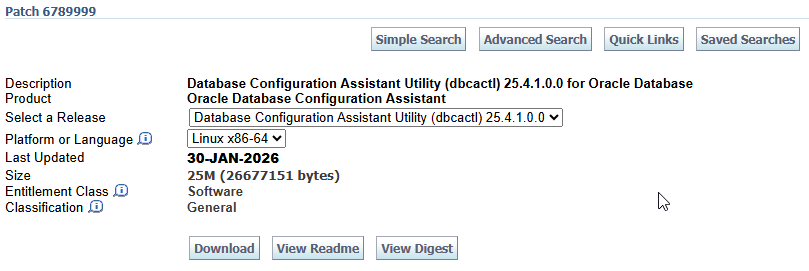
Once downloaded, just unzip somewhere. It contains just two files: dbcactl and README.txt
Few steps to use:
- Register with My Oracle Support
- Check status of Oracle Installation
- Request new Gold Image
- Download Gold Image
1. Register dbcactl with My Oracle Support
For this you need your CSI (Customer Support Identifier) number, which you find with your Oracle contract.
Then call the tool like this:
$ ./dbcactl -managePatches -registerUser -ssoUserName miguel.anjo@tradeware.ch -csiNumber 123456789
Loading DBCA...
Session ID of the current execution is: 2
-----------------
Running Initialization job
Enter SSO User password:

Completed Initialization job
33% complete
-----------------
Running Validate_inputs job
Completed Validate_inputs job
67% complete
-----------------
Running Register_sso_user job
Completed Register_sso_user job
100% complete
Look at the log file "/u00/app/oracle/cfgtoollogs/dbca/silent.log_2026-04-20_03-19-02PM_1953760" for further details.
If needed to access internet, provide also “-proxyServer”, “-proxyPort” and eventually also “-proxyUserName” arguments.
2. Check status of Oracle Installation
With the ORACLE_HOME environment set to an existing Oracle database installation, you can request the current status.
By default, it looks only at the Quarterly Release Updates. In my case it showed all is ok, as I have already Oracle 19.30 installed:
$ echo $ORACLE_HOME
/u00/app/oracle/product/19.30.0

$ ./dbcactl -managePatches -checkPatchStatus
Loading DBCA...
Session ID of the current execution is: 4
-----------------
Running Initialization job
Completed Initialization job
33% complete
-----------------
Running Validate_inputs job
Completed Validate_inputs job
67% complete
-----------------
Running Check_patch_status job
Completed Check_patch_status job
100% complete
---------- COMMAND OUTPUT ----------
{
  "softwareHealth" : "GREEN",
  "comment" : "Software meets recommendation",
  "recommendedVersion" : ""
}
---------- END OF COMMAND OUTPUT ----------
Look at the log file "/u00/app/oracle/cfgtoollogs/dbca/silent.log_2026-04-20_03-20-56PM_1957440" for further details.
However, if I ask to get the recommendation based on Monthly Patch Update, then it correctly finds I’m behind schedule:
./dbcactl -managePatches -checkPatchStatus -applyFrequency MONTHLY
Loading DBCA...
Session ID of the current execution is: 6
-----------------
Running Initialization job
Completed Initialization job
33% complete
-----------------
Running Validate_inputs job
Completed Validate_inputs job
67% complete
-----------------
Running Check_patch_status job
Completed Check_patch_status job
100% complete
---------- COMMAND OUTPUT ----------
{
  "softwareHealth" : "RED",
  "comment" : "More than one cycle behind your MRP policy.",
  "recommendedVersion" : "19.30.0.0.0"
}
---------- END OF COMMAND OUTPUT ----------
Look at the log file "/u00/app/oracle/cfgtoollogs/dbca/silent.log_2026-04-20_03-23-16PM_1961912" for further details.
The Recommended Version in output is not clear, as it should include the Month. This is a limitation due the versioning that changed with Oracle 26ai.
When we patch only once a year, or twice a year, we can choose “applyFrequency” as YEARLY or SEMI_ANNUAL and the Update Analyser will know if it is time to patch again.
3. Request new Gold Image
Once we know we need a new Patch, we can request Oracle to prepare a new Gold Image. This Gold Image will also take into consideration existing Patches in our Oracle Home.
$  ./dbcactl -managePatches -generateGoldImage -applyFrequency MONTHLY
Loading DBCA...
Session ID of the current execution is: 7
-----------------
Running Initialization job
Completed Initialization job
33% complete
-----------------
Running Validate_inputs job
Completed Validate_inputs job
67% complete
-----------------
Running Submit_generate_goldimage_request job
Completed Submit_generate_goldimage_request job
100% complete
---------- COMMAND OUTPUT ----------
{
  "serviceMessages" : [ ],
  "requestType" : "SoftwareGetStatusAndRecommendation",
  "requestStatus" : {
    "value" : "Pending",
    "response" : {
      "estimatedTime" : "2h",
      "uri" : "/v2/patchplanner/requests/23663",
      "requestID" : 23663
    },
    "message" : [ {
      "type" : "info",
      "code" : "UPD-01001",
      "shortDesc" : "In Progress",
      "cause" : "Request is in progress!",
      "action" : "Check after 'estimated time'",
      "field" : ""
    } ]
  },
  "locale" : {
    "langCode" : "en",
    "countryCode" : "US"
  },
  "referenceId" : "d5dda467-3640-43fc-8438-a2b08339e62c:1776691547118"
}
---------- END OF COMMAND OUTPUT ----------
Look at the log file "/u00/app/oracle/cfgtoollogs/dbca/silent.log_2026-04-20_03-25-32PM_1965815" for further details.
Interesting is that I’ve a pretty standard Oracle Home, with OCW and OJVM, but the estimated time is still 2h. Lets hope that in the future Oracle has a few prepared Oracle Homes with the standard patches ready for download.
4. Download Gold Image
If you try to early to download, you get information that you need to wait. No information about the progress of the creation.
And when an error arises, we get information to contact support.
./dbcactl -managePatches -downloadGoldImage -goldImageDownloadLocation /db_staging -requestID 23663
Loading DBCA...
Session ID of the current execution is: 12
-----------------
Running Initialization job
Completed Initialization job
25% complete
-----------------
Running Validate_inputs job
Completed Validate_inputs job
50% complete
-----------------
Running Check_goldimage_status job
Execution of Check_goldimage_status failed
75% complete
[FATAL] [DBT-60041] Oracle Update Advisor request failed.
   CAUSE: Unsuccessful response received from server.
More details: {
  "serviceMessages" : [ ],
  "locale" : {
    "langCode" : "en",
    "countryCode" : "US"
  },
  "requestType" : "SoftwareGetStatusAndRecommendation",
  "referenceId" : "d5dda467-3640-43fc-8438-a2b08339e62c:1776691547118",
  "requestStatus" : {
    "value" : "Completed",
    "response" : {
      "requestID" : "23663"
    }
  },
  "globalElement" : {
    "systemInfo" : {
      "platform" : "226",
      "cluster" : "false"
    },
    "policy" : {
      "updateLag" : "N",
      "applyFrequency" : "M",
      "notificationLevel" : null,
      "recommendationArea" : null
    }
  },
  "responseElement" : [ {
    "id" : "1",
    "systemInfo" : {
      "platform" : "226",
      "cluster" : "false"
    },
    "policy" : {
      "updateLag" : "N",
      "applyFrequency" : "M",
      "notificationLevel" : "Critical",
      "recommendationArea" : null
    },
    "installedSoftwareInfo" : {
      "version" : "19.30.0.0.0",
      "type" : "DB"
    },
    "installedSoftwareHealth" : {
      "status" : "RED",
      "comment" : "More than one cycle behind your MRP policy."
    },
    "recommendedSoftwareInfo" : {
      "version" : "19.30.0.0.0",
      "releaseDate" : "1768867200000"
    },
    "status" : {
      "value" : "Failed",
      "message" : [ {
        "type" : "error",
        "code" : "UPD-04028",
        "shortDesc" : "Unexpected error during conflict check",
        "cause" : "System encountered an unexpected error during conflict check",
        "action" : "Contact Support.",
        "field" : ""
      } ]
    },
    "stats" : {
      "requestedAtInISO" : "2026-04-20T13:25:47Z",
      "completedAtInISO" : "2026-04-20T13:59:38Z",
      "processingDuration" : "33m"
    },
    "goldImage" : "TRUE"
  } ]
}

*** Executing jobs which need to be run always... ***

******** PLUGIN EXECUTION FAILED ********

Look at the log file "/u00/app/oracle/cfgtoollogs/dbca/silent.log_2026-04-20_04-16-24PM_2048597" for further details.
In conclusion, the new Oracle Update Advisor, integrated in dbca (or dbcactl for 19c) is a nice complement to Oracle base installation. It facilitates check and download of new Golden Images based on current installation. It presents as an alternative to Oracle AutoUpgrade, which it targeted to more complex migrations/upgrades/updates.