
Monthly Archives: April 2026


Oracle Update Advisor in 19c – tutorial of the new easy way to find and download Oracle DB release updates

Oracle released a new version of its “Oracle Update Advisor”. This tool is part of Oracle AI Database 26ai, allows to anyone to check if their Oracle installation is up to date and download a new Gold Image updated to the latest version.

When using it with Oracle 19c, you need to download the tool “dbcactl“, which complements existing Database Creation Assistant – dbca – with the “managePatches” option – this is the Oracle Update Advisor.

To download dcbactl, you need to go to https://updates.oracle.com/download/6789999.html . While latest available version visible is 26.2.1, it is not downloadable. I did my tests using the version 25.4.1.

(more…)
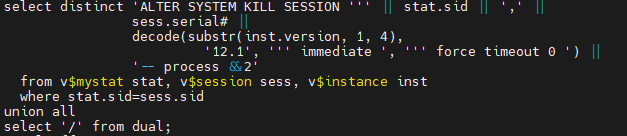
Alter system kill session “force timeout 0” ? new form of “kill immediate”?

The other day I saw that besides the catcon.pl, there is a catcon_kill_sess_gen.sql:

ls -1 $ORACLE_HOME/rdbms/admin/catcon*
/u00/app/oracle/product/19.30.0/rdbms/admin/catcon_kill_sess_gen.sql
/u00/app/oracle/product/19.30.0/rdbms/admin/catcon.pl
/u00/app/oracle/product/19.30.0/rdbms/admin/catcon.pm
/u00/app/oracle/product/19.30.0/rdbms/admin/catconst.pm
/u00/app/oracle/product/19.30.0/rdbms/admin/catcont.sql

When looking at this file, I noticed it kills catcon session using a “ALTER SYSTEM KILL SESSION ‘sid, serial#’ FORCE TIMEOUT 0”, except if on Oracle 12.1, where still does “IMMEDIATE” instead:

This new syntax “FORCE TIMEOUT x” is first described in Oracle AI 26ai DB documentation (but it seems to work from version 12.2). Basically it theoretically allows the draining of sessions by setting a timeout until the session terminates some task, before killing it.

There are two new elements here: “FORCE” and “TIMEOUT x”.

(more…)

SQL and how Oracle filter the resultset

While reading the very interesting Oracle AI Database 26ai New Features Guide, I got to know that there is a new “QUALIFY” filter clause (there is also a new “FILTER” clause). However, what I found more interesting in the documentation was this sentence:

The order of operations is as follows: FROM → WHERE → GROUP BY → HAVING → WINDOW → QUALIFY → DISTINCT → ORDER BY → FETCH FIRST.

This is somehow a back to the roots and basic SQL information that I had in the back of my head, but never though really end-to-end about.

Here an example of query using all except DISTINCT elements of the operations order:

SELECT region, city, AVG(temperature), AVG(AVG(temperature)) OVER w AS avg_temp_region 
    FROM city, regions 
    WHERE city.region_id = region.region_id 
    GROUP BY region, city 
    HAVING region NOT LIKE 'LISBON' 
    WINDOW w AS (PARTITION BY region)
    QUALIFY avg_temp_region > 10
    ORDER BY region
    FETCH FIRST 5 ROWS ONLY;

I don’t think I could write a SQL like that, but at least now I know how it looks like.