Yearly Archives: 2026


Alter system kill session “force timeout 0” ? new form of “kill immediate”?

The other day I saw that besides the catcon.pl, there is a catcon_kill_sess_gen.sql:

ls -1 $ORACLE_HOME/rdbms/admin/catcon*
/u00/app/oracle/product/19.30.0/rdbms/admin/catcon_kill_sess_gen.sql
/u00/app/oracle/product/19.30.0/rdbms/admin/catcon.pl
/u00/app/oracle/product/19.30.0/rdbms/admin/catcon.pm
/u00/app/oracle/product/19.30.0/rdbms/admin/catconst.pm
/u00/app/oracle/product/19.30.0/rdbms/admin/catcont.sql

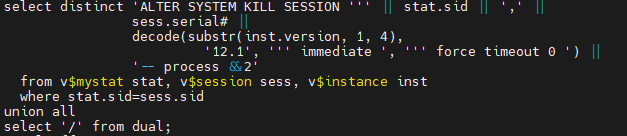
When looking at this file, I noticed it kills catcon session using a “ALTER SYSTEM KILL SESSION ‘sid, serial#’ FORCE TIMEOUT 0”, except if on Oracle 12.1, where still does “IMMEDIATE” instead:

This new syntax “FORCE TIMEOUT x” is first described in Oracle AI 26ai DB documentation (but it seems to work from version 12.2). Basically it theoretically allows the draining of sessions by setting a timeout until the session terminates some task, before killing it.

There are two new elements here: “FORCE” and “TIMEOUT x”.

What I understood from documentation is:

When not using the “FORCE” keyword, the two following commands behave the same way:

ALTER SYSTEM KILL SESSION ‘sid, serial#’ IMMEDIATE = ALTER SYSTEM KILL SESSION ‘sid, serial#’ TIMEOUT 0

Basically, it instructs Oracle to terminate a session and roll back ongoing transactions, release all session locks, recover the entire session state, and return control to you immediately.

With the “FORCE” keyword alone, it terminates the session like “IMMEDIATE”, however waiting first for a timeout of 5 seconds.

With the “FORCE TIMEOUT 0”, then the connection is closed immediately, when there is some activity going on.

Here a summary of what I observed:

ALTER SYSTEM KILL SESSION command:Kill idle sessionKill ongoing select
… IMMEDIATEKiller:
System altered.
Killed session:
ORA-03135: connection lost contact
ORA-03114: not connected to ORACLE
Killer:
ORA-00031: session marked for kill
Killed session:
ORA-00028: your session has been killed
… FORCEKiller:
System altered.
Killed session:
ORA-03135: connection lost contact
ORA-03114: not connected to ORACLE
Killer:
System altered.
Killed session:
ORA-00028: your session has been killed
… TIMEOUT 0Killer:
System altered.
Killed session:
ORA-00028: your session has been killed
ORA-01012: not logged on
Killer:
ORA-00031: session marked for kill
Killed session:
ORA-00028: your session has been killed
… FORCE TIMEOUT 0;Killer:
System altered.
Killed session:
ORA-03135: connection lost contact
ORA-03114: not connected to ORACLE
Killer:
System altered.
Killed session:
ORA-03113: end-of-file on communication channel

Just for completion, if using “DISCONNECT SESSION” instead, then the session might just automatically failover if the parameters are correctly set.

Le me know if you have other inputs.


SQL and how Oracle filter the resultset

While reading the very interesting Oracle AI Database 26ai New Features Guide, I got to know that there is a new “QUALIFY” filter clause (there is also a new “FILTER” clause). However, what I found more interesting in the documentation was this sentence:

The order of operations is as follows: FROM → WHERE → GROUP BY → HAVING → WINDOW → QUALIFY → DISTINCT → ORDER BY → FETCH FIRST.

This is somehow a back to the roots and basic SQL information that I had in the back of my head, but never though really end-to-end about.

Here an example of query using all except DISTINCT elements of the operations order:

SELECT region, city, AVG(temperature), AVG(AVG(temperature)) OVER w AS avg_temp_region 
    FROM city, regions 
    WHERE city.region_id = region.region_id 
    GROUP BY region, city 
    HAVING region NOT LIKE 'LISBON' 
    WINDOW w AS (PARTITION BY region)
    QUALIFY avg_temp_region > 10
    ORDER BY region
    FETCH FIRST 5 ROWS ONLY;

I don’t think I could write a SQL like that, but at least now I know how it looks like.


How to Patch/Upgrade Java (JDK and JRE) in both Oracle Home and OEM Agent 13.5 home to latest certified version

A vulnerability scan from the customer pointed out many problems due to old patch backups and old JDK versions installed in a Oracle VM.

Many of the problems were with the files:

/u01/app/oracle/product/oem13c/agent/agent_13.5.0.0.0/oracle_common/jdk/jre/lib/rt.jar
/u01/app/oracle/product/19.0.0/dbhome_1/jdk/jre/lib/rt.jar

What I learned:

  • OEM Agent 13.5 default java version is 1.8.0_261, also after patching to the latest RU!
  • Oracle OPatch has its own JRE and this is not updated when applying latest JDK patch for Oracle Home
  • Upgrade JDK in Oracle Home is online

What I already knew:

Below how I “cleanup” the vulnerabilities at my customer VM. This instructions are for java version 1.8.0_481, latest certified for Oracle in January 2026 :

(more…)

Follow the progress of a PDB remote cloning

For a PDB migration, I’ve configured a Refresh PDB clone.

SQL> CREATE PLUGGABLE DATABASE P1QXPTO from P1QXPTO@C1Q_OLDCDB REFRESH MODE EVERY 2 HOURS;

The PDB is 16TB and copying will take a few hours. To get the progress, it is not so straight forward:

  • there is no size in V$PDBs until the end
  • the ASM space is reserved from the beginning
  • there are no files in V$DATAFILE or V$ASM_FILE during the copy

The only place to follow the PDB clone is using V$SQL_LONGOPS, as explained at KB135098 – How to Monitor PDB Clone / Move On ‘Create Pluggable Database’ with ‘COPY’ Clause Statement Execution.

(more…)