The download page of Oracle OPatch has quite some room for improvement: put some ‘order by’ on the version and platform would be welcome. Also, make clear that there are very few versions of it.
In fact, for database, there are just two versions of OPatch! One OPatch version that covers all database supported versions from 12.1 to 20c. For paid long-term supported Oracle 11.2 there is another version.
So, in summary, here the OPatch version you need to patch your DBs:
For Enterprise Manager (middleware) there is another OPatch version, 13.9.x which I don’t have experience with.
The information about which OPatch versions is needed to apply the Database RU, RUR, is now part of the Patch Availability Document. For instance for OCtober 2020, this is what we can see:
Note 1: For Enterprise Manager (middleware) there is another OPatch version, 13.9.x which I don’t have experience with.
Note 2 – for Oracle guys out there: when we see the current size of the Release Updates, maybe it would be worth to include the latest version of OPatch within it. It would not increase so much the size and avoid the need of checking if we have the latest OPatch.
Man shall pay only for what it uses. This is also a motto of the Cloud and Oracle with second-level billing pushes this model.
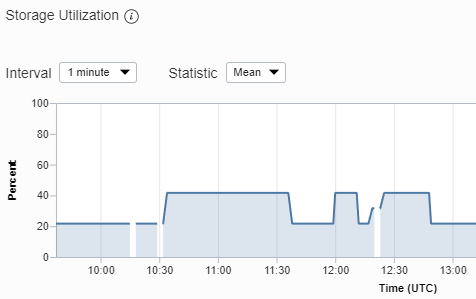
Concerning disk space, however, it is not always easy. While terabyte prices are getting cheaper, sometimes you make a big cleanup of your database and then you would like to pay only for what is being used.
On Oracle Autonomous Databases it is the sum of datafiles size that counts.
Image now that you have a huge table and then drop it. The datafile space is not recovered.
In order to recover space you need:
Purge the recycle bin:
SQL> purge dba_recyclebin
reduce size of DATA tablespace datafile
SQL> alter database datafile <file_id> resize yyyM;
Now, this will be possible only if there are no extents used at the end of the datafile. Otherwise, one can try to alter table <table_name> move online; and then alter tablespace <tbs_name> coalesce; but this is not sure to help.
During my tests I only had one table, which made things easier.
Let’s hope that Oracle either changes the way to calculate the space used or provides a way to (continuous) defragment a datafile and make the size dynamic.
To check the storage used on Autonomous Database and find the datafile file_id, you can run the following query:
-- Get Space used by tablespace and file_id
select TBS "File_ID-Tablespace",
round(sum(bytes)/1024/1024/1024,2) USED_GB,
round(sum(bytes)/max(PROPERTY_VALUE)*100) PCT
from
(select file_id||'-'||tablespace_name TBS, bytes
from DBA_DATA_FILES
where tablespace_name!='SAMPLESCHEMA'),
(select PROPERTY_VALUE
from DATABASE_PROPERTIES
where PROPERTY_NAME = 'MAX_PDB_STORAGE')
group by rollup(TBS);
FILE_ID-TABLESPACE USED_GB PCT
------------------ ------- ---
3252-SYSTEM 0.41 2
3253-SYSAUX 3.16 16
3254-UNDOTBS1 0.44 2
3255-DATA 0.1 0
3256-DBFS_DATA 0.1 0
4.2 21
-- Get Total space used by DB
select round(USED_BYTES/1024/1024/1024,2) USED_GB,
round(MAX_BYTES/1024/1024/1024,2) MAX_GB,
round(USED_BYTES/MAX_BYTES*100,2) PCT_USED
from
(select PROPERTY_VALUE MAX_BYTES
from DATABASE_PROPERTIES
where PROPERTY_NAME = 'MAX_PDB_STORAGE'),
(select sum(BYTES) USED_BYTES
from DBA_DATA_FILES
where TABLESPACE_NAME != 'SAMPLESCHEMA');
USED_GB MAX_GB PCT_USED
------- ------ --------
4.2 20 21.01
Using the Free Tier of Oracle Cloud I created one Autonomous DB of each type – one Autonomous Transaction Processing and one Autonomous Data Warehouse (Autonomous JSON are not yet available). Then did run
select name, display_value from v$parameter where isdefault='FALSE' order by 1;
on each of the DBs, I got the follow differences (empty means not set):
Parameter
ATP
ADW
optimizer_ignore_hints
TRUE
optimizer_ignore_parallel_hints
TRUE
parallel_degree_policy
AUTO
parallel_min_degree
CPU
pdb_lockdown
OLTP
DWCS
pga_aggregate_target
3000M
5100M
resource_manager_plan
FORCE:OLTP_PLAN
FORCE:DWCS_PLAN
result_cache_max_result
1
result_cache_mode
MANUAL
FORCE
sga_target
8000M
3400M
Both the databases (PDB) share the same Container (CDB).
I did check also
select * from database_properties;
but there are no initial state differences.
Something I found interesting. I had a 2-month old ATP when I created the ADW. Immediately I saw that my old ATP was not using ASM, compared to the ADW, also that ADW was a cluster DB while the old ATP was single instance.
I recreated the ATP to check if this remained. But no. My new ATP was co-located on the same database as the ADW, so parameters are mostly the same as we could see above.
For historical reasons, I leave here the parameter changes between ATP created in June and end-August 2020. For paths, only the differences are highlighted:
Recover a Oracle 11.1.0.6 on Windows installation. I’ve all files in an external drive and I’m trying to make the DB to run on my laptop.
I’ve copied to my local disk;
Added the entries to the registry that found necessary
Re-created the Inventory
Re-created a init file with correct locations from the spfile
Now I had still had the error:
SQL> startup nomount
ORA-02778: Name given for the log directory is invalid
Nothing on the logs, all directories mentioned on pfile exist and are writable.
I’ve downloaded the Microsoft ProcessMonitor, configured to trace only Oracle company processes and looked what it tried to read.
Finally I found the culprit: %ORACLE_HOME%\RDBMS\log was missing. Just the log subfolder.
This was during the xcopy to the local disk, I excluded all “log” files, as there were some huge ones. Unfortunately it also excluded this folder. Now looks better:
SQL> startup nomount
ORACLE instance started.
Total System Global Area 1720328192 bytes
Fixed Size 2130160 bytes
Variable Size 989859600 bytes
Database Buffers 721420288 bytes
Redo Buffers 6918144 bytes
SQL>
It was nice to see that most of them offer either a powerpoint or icon set that you can use for your presentations. Here is the link for the ones I use:
Queue tables are used to take care of events. There is a mechanism that insert rows and another that takes care of the existing rows, usually deleting them at the end.
When possible one should use Oracle Advanced Queuing mechanism which takes care of managing the queue and a simple request will give you the next in the line.
Some applications develop their own queuing systems and it is a good way to learn how queue works.
Imagine a table with a list of elements and two specific columns:
order of arrival
priority
The first to be served is the one that, having the highest priority, was the first to arrive.
Oracle and Microsoft announced in June 2019 a cloud interoperability partnership which enables workloads across Microsoft Azure and Oracle Cloud. By creating a first joint multi-cloud solution, the software giants can each continue to provide the best of their services. At the same time customers do not need to decide which vendor they opt-out when moving their on-premises constructs.
Being myself an Oracle Database Administrator, this article aims to check what is the impact of distributing resources in multiple clouds, with databases remaining on Oracle Cloud Infrastructure.
It is not aim of the article to discuss the costs of resources on any of the clouds.
On OCI, to be able to ping between hosts, it might be necessary to add an Ingress rule that allows pings. The rule should look like below. The most important is the Protocol ICMP and type 8. The source CIDR should not be larger than the VCN CIDR.
Test if port is open:
To check if the remote port is open, I use the follow commands. This works both with IPs or hostnames and also lets you know if port is open, but listener is not running (on this port):
[opc@alfama ~]$ ### PORT UNREACHEABLE, SERVER DOWN/WRONG? ###
[opc@alfama ~]$ export CHECK_IP="10.1.2.4/1521"
[opc@alfama ~]$ timeout 1 bash -c '</dev/tcp/${CHECK_IP} && echo Port ${CHECK_IP} is open || echo Port ${CHECK_IP} is closed' || echo Connection timeout
Connection timeout
[opc@alfama ~]$ ### PORT OPEN, USING HOSTNAME ###
[opc@alfama ~]$ export CHECK_IP="luz.subnetpriv2/1521"
[opc@alfama ~]$ timeout 1 bash -c '</dev/tcp/${CHECK_IP} && echo Port ${CHECK_IP} is open || echo Port ${CHECK_IP} is closed' || echo Connection timeout
Port luz.subnetpriv2/1521 is open
[opc@alfama ~]$ ### PORT OPEN, USING IP ###
[opc@alfama ~]$ timeout 1 bash -c '</dev/tcp/${CHECK_IP} && echo Port ${CHECK_IP} is open || echo Port ${CHECK_IP} is closed' || echo Connection timeout
Port 10.1.5.3/1521 is open
[opc@alfama ~]$ ### PORT CLOSED ###
[opc@alfama ~]$ export CHECK_IP="luz.subnetpriv2/1522"
[opc@alfama ~]$ timeout 1 bash -c '</dev/tcp/${CHECK_IP} && echo Port ${CHECK_IP} is open || echo Port ${CHECK_IP} is closed' || echo Connection timeout
bash: connect: No route to host
bash: /dev/tcp/luz.subnetpriv2/1522: No route to host
Port luz.subnetpriv2/1522 is closed
[opc@alfama ~]$ ### PORT OPEN but LISTENER DOWN ###
[opc@alfama ~]$ timeout 1 bash -c '</dev/tcp/${CHECK_IP} && echo Port ${CHECK_IP} is open || echo Port ${CHECK_IP} is closed' || echo Connection timeout
bash: connect: Connection refused
bash: /dev/tcp/10.1.5.3/1521: Connection refused
Port 10.1.5.3/1521 is closed
Bonus
At Oracle OCI, one can access other VMs of the VCN using the <hostname>.<subnet>
On Azure, the <hostname> is enough to access other host of the VNet.
These days I’ve been playing with Oracle Cloud and Azure. It is best practice to have a bastion or jumphost server with public IP address and all the rest on private networks, only accessible internally.
Also, there is no use of passwords and only the ssh public key of the user is located on the servers. Usually this is what we try to do:
To start with, I use MobaXterm to access my servers. There I’ve configured my SSH private keys to be loaded:
Connect to jumphost server and take SSH key
Use the -A option when connecting:
ssh -A opc@bastion-server
Then you can do ssh to the next server in the private subnet without password. Example of not using and using this option:
Connect to private server via jumphost directly
For this we use both -A and -J options:
ssh -A -J opc@bastion-server opc@private-server
SCP directly to private server via JumpHost
Here we have to use a ProxyJump option of scp in this case:
On January 28th 2020 I reported to Oracle on a Severy 1 SR that the latest OPatch version tries to delete system files from /etc, /bin, /lib :
I wrote in the SR the use case, provided the logs. On my case, the opatch cleanup command “just” deleted the configuration files of my backup client in /etc (opatch deletes files that are writable by the user who calls the command – ‘oracle’/’grid’ in most of the cases).
The location from where ‘opatch cleanup util’ tries to delete files depends from where you call it! So, if you call from / or from $ORACLE_BASE or from $ORACLE_HOME/OPatch you’ll get different behaviours!
It took two months until I got an answer to that SR, saying a bug was created and it will be fixed on the next version of OPatch:
Today there was a release of April 2020 Security patches, the latest Oracle Patch Bundles. To my surprise, for Oracle versions 12.2, 18c and 19c, there is the requirement of using OPatch 12.2.0.1.19 version, the exact same version that has this dangerous bug!
The bug reported end of January was not yet fixed! At least, on OPatch readme there is now a warning:
So, be careful until then and do not use ‘opatch util cleanup’. Anyway, this command is not anymore needed, as a cleanup (without deleting any wrong file) of the $ORACLE_HOME/.patch_storage directory is automatically done at the end of the patching.