Miguel Anjo


New Oracle Support portal DocID to KB link translation 2

Here is a table with the correspondence between the Document ID from the legacy My Oracle Support portal and correspondent KB document and link on the new portal.

Sometimes it is possible to find the new DocID by using these URLs:
https://support.oracle.com/support/?kmContentId=<oldDocID without ending .1>
or
https://support.oracle.com/epmos/faces/DocumentDisplay?id=<oldDocID>

For instance, DocID: 888.1 can be found with (note removed ending .1): https://support.oracle.com/support/?kmContentId=888

To download patches, you can use this URL: https://support.oracle.com/support/?patchId=<patchID>

These are the new links for the documents I use the most…

Update 10.12.2025: Oracle provided a similar link translation table with the Top50 Documents.

Old MOSNew MOSLink
Doc ID 153788.1KA953(KA953) ORA-600/ORA-7445/ORA-700 Error Look-up Tool (does not exist anymore)
Doc ID 153788.1KA600(KA600) ORA-600/ORA-7445/ORA-700 Error Look-up Tool (was KB600…)
Doc ID 888.1KB106822(KB106822) Primary Note for Database Quarterly Release Updates
Doc ID 2193391.1KB136647(KB136647) Latest Oracle GoldenGate For Oracle Database & Oracle Database Patch Recommendations
Doc ID 2118136.2KA958(KA958) Assistant: Download Reference for Oracle Database/GI Update, Revision, PSU, SPU(CPU), Bundle Patches, Patchsets and Base Releases
Doc ID 2774779.1KB38275(KB38275) (ODyS) Oracle Dynamic Scaling engine – Scale-up and Scale-down automation utility for OCI DB System (ExaDB-D/ExaDB-C@C/ExaDB-XS)
Doc ID 888828.1KB153930(KB153930) Exadata Database Machine and Exadata Storage Server Supported Versions
Doc ID 2550798.1KB858617Autonomous Health Framework (AHF) – Including Trace File Analyzer and Orachk/Exachk
Doc ID 822485.1PNEWS1689Overview of the Enterprise Manager Proactive Patch Program


Classic My Oracle Support is gone 1

This morning I wanted to look for a note and to my surprise the old Metalink, then My Oracle Support portal, did not exist anymore.

All is now merged in the new “My Oracle Support” site, previously known as “My Oracle Cloud Support”.

The link to bookmark is https://support.oracle.com/support/

New DocID, now is KB

Important to notice is, The  DocID number were changed. For instance, to find the following note:
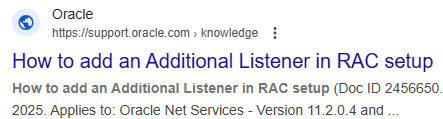
    ”How to add an Additional Listener in RAC setup (Doc ID 2456650.1)”

You need to look for the title. The document has now a new ID, starting with KB (Knowledge Base):

The links from Google are still not updated and do not work.

The solution is to search for the title in the new Oracle Support site.

Or use the MOS DocId to KB link translation I’ve compiled.

Old SRs, new SRs

The SRs from the “classic” portal are now at the end of the list as “Archived Service Requests”.

There are three headings now:

  1. These service requests need your attention
  2. Oracle is working on these service requests for you
  3. Archived Service Requests (last 2 years from old portal)

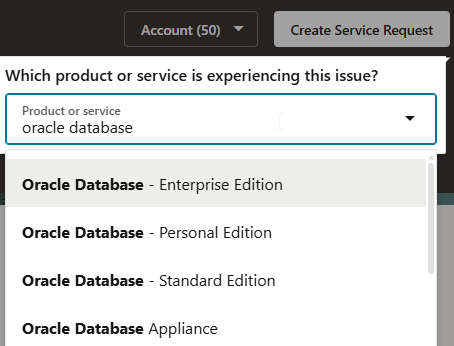
To create new SRs for On-premises, you need to search for “Oracle Database”:

Feedback

Unfortunately there is not anymore the possibility to:

  • see last searches
  • see last views documents/notes
  • favorites
  • use old DocID in the search (would be enough to keep in the text of the new note!)
  • No wget script to download patches
  • Search engine does not prioritize most viewed notes

I’ll get used to the new portal, but as everytime, changes are not easy.

Status 10.12.2025:


Recognize Oracle Client installation

On my environment script I want to recognize if an ORACLE_HOME belongs to a database or is just a client installation. Oracle does the following in its Oracle 26ai client runInstaller:

...
ORACLE_SERVER_PATH="${ORACLE_HOME}/inventory/Components21/oracle.server";
ORACLE_GSM_PATH="${ORACLE_HOME}/inventory/Components21/oracle.dslm";
# Check if the directory oracle.server exists
# If it exists, then the product is db otherwise is client
if [ -d $ORACLE_SERVER_PATH ]; then
...
  ${ORACLE_HOME}/perl/bin/perl -I${ORACLE_HOME}/perl/lib -I${ORACLE_HOME}/bin ${ORACLE_HOME}/bin/dbSetup.pl -J-D${CVU_OS_SETTINGS} "$@"   # bug 33519960 - support paths with whitespaces
else
  if [ -d $ORACLE_GSM_PATH ]; then
    ${ORACLE_HOME}/perl/bin/perl -I${ORACLE_HOME}/perl/lib -I${ORACLE_HOME}/bin ${ORACLE_HOME}/bin/dbSetup.pl "$@"      # bug 33519960 - support paths with whitespaces
  else
    ${ORACLE_HOME}/perl/bin/perl -I${ORACLE_HOME}/perl/lib -I${ORACLE_HOME}/bin ${ORACLE_HOME}/bin/clientSetup.pl "$@"      # bug 33519960 - support paths with whitespaces
  fi
fi

Basically here the logic:

  • Directory ${ORACLE_HOME}/inventory/Components21/oracle.server exists ➡️ Oracle Database installation
  • Directory ${ORACLE_HOME}/inventory/Components21/oracle.dslm exists ➡️ Global Data Services installation

On my script I simplified by checking:

  • File ${ORACLE_HOME}/bin/clientSetup.pl exists ➡️ Oracle Full client installation

Otherwise is a DB installation, as I don’t expect to use my script in any GDS server.


Extend Swap in Oracle Linux

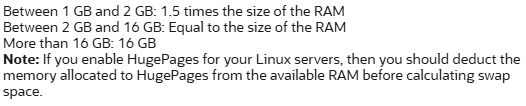
The client has also configured a small Swap mountpoint, when looking at all memory available on the server. Oracle documentation says this:

The VM has 116GB memory, and 32GB reserved for HugePages. The actual swap mountpoint is 4GB big and, based on the Oracle Server Configuration Checklist for 19c, the swap mountpoint should be in this case 16GB.

I’m using Oracle Linux 9, xfs filesystems. I’ll increase the swap mountpoint online, with the databases running.

(more…)

Extend partition from VMWare in Oracle Linux – part 2 2

The client uses VMWare as virtualization platform for the Oracle Database VMs (yes, he is aware of the License implications).

The VM is running out of space in two partitions. The VMWare Admin extended the disks on their platform. Now I need to make this extension visible in Oracle Linux. This things we do once every 10 years, when versions, filesystems and tools already changed.

For this post in 2025, I’m using Oracle Linux 9, xfs filesystems. All operation are online, with databases running.

I divide this post in two parts:

Extend a mountpoint within several partitions in a block device

oracle@vmware-vm01 MIG01C $ cat /etc/system-release 
Oracle Linux Server release 9.6

The partition tree is below, and I need to increase the /u01 from 50G to 100G. The disk is /dev/sda

[root@vmware-vm01 ~]# lsblk
NAME                             MAJ:MIN RM   SIZE RO TYPE MOUNTPOINTS
sda                                8:0    0   774G  0 disk 
├─sda1                             8:1    0   250M  0 part /boot/efi
├─sda2                             8:2    0     1G  0 part /boot
└─sda3                             8:3    0    77G  0 part 
  ├─ol_vmware-vm02-root          252:0    0    10G  0 lvm  /
  ├─ol_vmware-vm02-swap          252:1    0     4G  0 lvm  [SWAP]
  ├─ol_vmware-vm02-var_log_audit 252:2    0     1G  0 lvm  /var/log/audit
  ├─ol_vmware-vm02-u01           252:3    0    50G  0 lvm  /u01
  ├─ol_vmware-vm02-home          252:4    0     5G  0 lvm  /home
  ├─ol_vmware-vm02-var_log       252:5    0     2G  0 lvm  /var/log
  └─ol_vmware-vm02-var           252:6    0     5G  0 lvm  /var
sdb                                8:16   0   100G  0 disk 
└─sdb1                             8:17   0   100G  0 part 
  └─vg_u02-lv_u02                252:7    0   100G  0 lvm  /u02
(more…)

Extend partition from VMWare in Oracle Linux – part 1 2

The client uses VMWare as virtualization platform for the Oracle Database VMs (yes, he is aware of the License implications).

The VM is running out of space in two partitions. The VMWare Admin extended the disks on their platform. Now I need to make this extension visible in Oracle Linux. This things we do once every 10 years, when versions, filesystems and tools already changed.

For this post in 2025, I’m using Oracle Linux 9, xfs filesystems. All operation are online, with databases running.

I divide this post in two parts:

Extend single partition of block device

oracle@vmware-vm01 MIG01C $ cat /etc/system-release 
Oracle Linux Server release 9.6

The partition tree is below, and I need to increase the /u02 from 100G to 300G. The disk is /dev/sdb

[root@vmware-vm02 ~]# lsblk 
NAME                             MAJ:MIN RM   SIZE RO TYPE MOUNTPOINTS
sda                                8:0    0   774G  0 disk 
├─sda1                             8:1    0   250M  0 part /boot/efi
├─sda2                             8:2    0     1G  0 part /boot
└─sda3                             8:3    0    77G  0 part 
  ├─ol_vmware-vm02-root          252:0    0    10G  0 lvm  /
  ├─ol_vmware-vm02-swap          252:1    0     4G  0 lvm  [SWAP]
  ├─ol_vmware-vm02-var_log_audit 252:2    0     1G  0 lvm  /var/log/audit
  ├─ol_vmware-vm02-u01           252:3    0    50G  0 lvm  /u01
  ├─ol_vmware-vm02-home          252:4    0     5G  0 lvm  /home
  ├─ol_vmware-vm02-var_log       252:5    0     2G  0 lvm  /var/log
  └─ol_vmware-vm02-var           252:6    0     5G  0 lvm  /var
sdb                                8:16   0   100G  0 disk 
└─sdb1                             8:17   0   100G  0 part 
  └─vg_u02-lv_u02                252:7    0   100G  0 lvm  /u02
sr0                               11:0    1 356.9M  0 rom  
(more…)

TDE misconfigured and ORA-28353: failed to open wallet

I did script the TDE wallet configuration for my client.

  • Script 1 – Set the static parameters TABLESPACE_ENCRYPTION and WALLET_ROOT in the spfile.
  • Script 2 – Restart the database
  • Script 3 – Create the wallet, open the wallet, set the Masterkey, create the autologin wallet.

When running this 3rd script on a database it failed on the second command:

SQL> ADMINISTER KEY MANAGEMENT CREATE KEYSTORE IDENTIFIED BY  "wallet_password";
keystore altered.

SQL> ADMINISTER KEY MANAGEMENT SET KEYSTORE OPEN IDENTIFIED BY "wallet_password";
ADMINISTER KEY MANAGEMENT SET KEYSTORE OPEN IDENTIFIED BY "wallet_password"
*
ERROR at line 1:
ORA-28353: failed to open wallet
(more…)

Recover missing Masterkey – the famous ORA-28374 2

The client plugged a non-encrypted PDB into a CDB with TDE Encryption Wallet enabled. All works fine, we can read the data. However when trying to create a tablespace we get:

CDB1 SQL> create tablespace TBS_NEW;
Error starting at line : 1 in command -
create tablespace t1
Error report -
ORA-28374: typed master key not found in wallet
28374. 0000 -  "typed master key not found in wallet"
*Cause:    You attempted to access encrypted tablespace or redo logs with a typed master key not existing in the wallet.
*Action:   Copy the correct Oracle Wallet from the instance where the tablespace was created.

What is wrong?

(more…)

Configuring Hybrid Dataguard and have standby on OCI without the need of advanced security license

Hybrid Dataguard is a relatively new 19c feature that allows to have one side of a Dataguard configuration not encrypted. This is particularly useful when having a primary on premises and standby on a OCI, where tablespaces need to be encrypted. The main point is that it allows to spare a Advanced Security licenses on premises site.

Usages of Hybrid Dataguard can be during migration to the cloud or just as a high availability solution, when we have a small on-premises data center.

In the tutorial below I assume to have a primary database on premises without TDE, a we will create a standby in OCI with encryption enabled. The connection between on-premises and OCI is already configured and not explained.

(more…)

Oracle TDE – the basic information you need to know when encrypting the whole database

TDE – Transparent Data Encryption – is the Oracle solution for protecting data at rest. This refers, protecting data that is stored in one file or one disk. This data will be encrypted. Only after the database is open and the wallet password is given, you can query the data and see it.

Recently I’ve been working more with ExaCC and migrating databases from on-premises to the Cloud. Took quite some days to get into TDE and sometimes confusing terms used in the documentation and on the web.

This post summarizes all the concepts to have in mind when working with Oracle encrypted databases, which is the default in the Cloud and Exadata systems.

(more…)